
Suggestions
Welcome to the Redgate Monitor feature suggestions list. Tell us how we can improve Redgate Monitor by voting on these suggestions or by submitting your own ideas.
This is the easiest way to make an impact on Redgate Monitor’s roadmap. Check out the completed suggestions to see how your ideas have influenced us in the past. Please note that this list is one of multiple sources that drive our development, meaning that we will not always implement the highest-ranking suggestions.
To give your idea the greatest possible impact, please follow these guidelines:
- Describe the goal you’re trying to accomplish, rather than a specific solution to get there
- If you have a favoured solution, add it as a comment to your suggestion
- Give us as much context as possible
- Only make one suggestion per post. If you have multiple ideas, submit them in separate posts
- Comment and vote on existing posts to develop the ideas — the Redgate Monitor team will often stay quiet initially about new suggestions to see what you have to say!
If you have any questions visit the Redgate Monitor forum.
- or
753 results found
-
Add button to hide new grouping and use old grouping
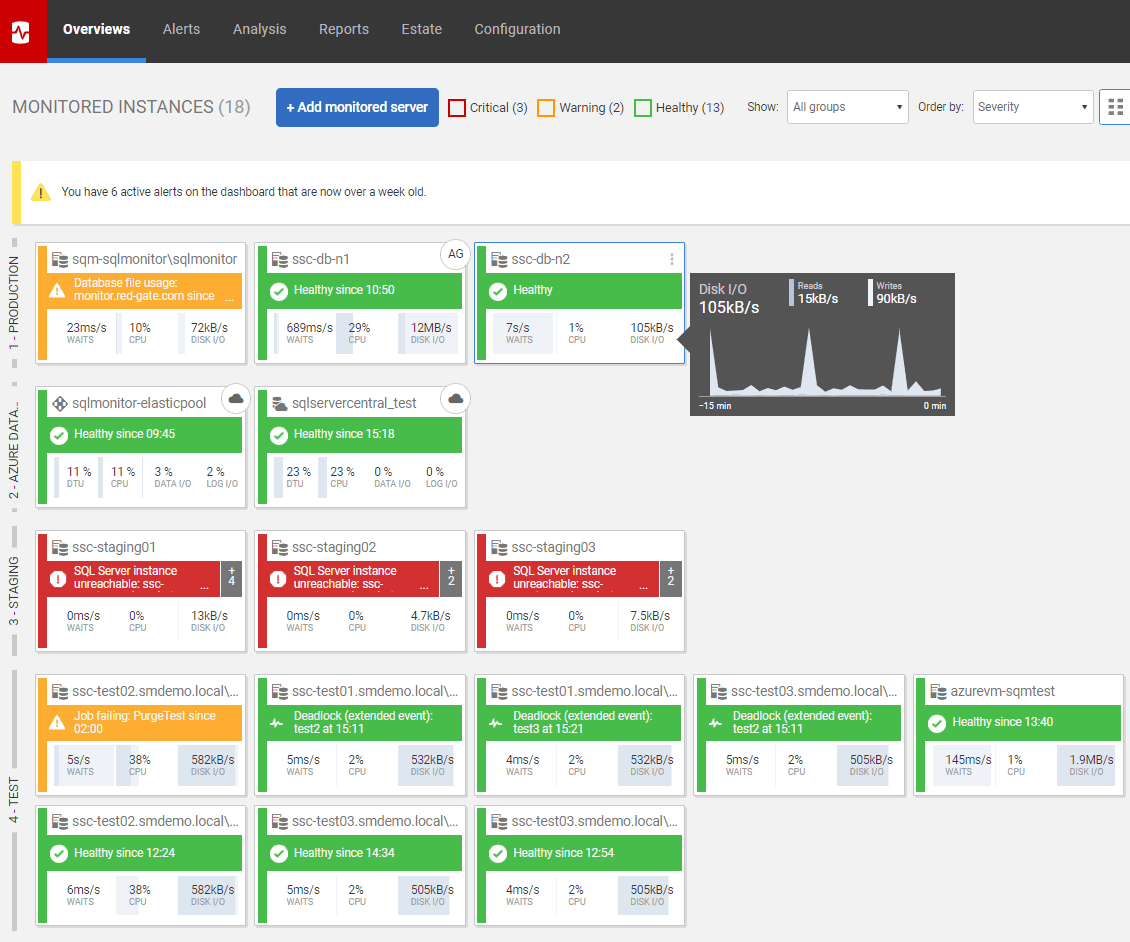
Although the grouping seemed interesting at first, it means now our servers don’t fit on our screen anymore.
I would suggest adding a button to the "Group by" header that says "no headers" (or maybe a checkbox somewhere).
This button (or checkbox) would show the "old" layout again with the grouping on the left side as here: https://www.red-gate.com/wp-content/uploads/2019/10/SQL-Monitor.png
There is much more horizontal screen real estate than there is vertical; because of these new grouping headers we now need to scroll to see our DEV servers.
I am fully aware I can click the headers to…
3 votesHi Andy.
Thanks for the feedback. Groups can be opened and closed and the card sizes can be changed to control the number of instances visible. We feel that it’s important to show the group headings on the dashboard.
Thanks,
Neil
(Lead product designer – SQL Monitor) -
See job history beyond one month
Currently the Estate Job page only offers a view of a day, week or month, but sometimes we need to see trends beyond one month.
Is it possible to add a variable window? Or a fixed one of a year?6 votes -
Provide a report on queries with suggestions on improving performance
When viewing the top 10 queries, we can see suggestions on what may improve the performance for the specific query. Can this functionality be summarized in one report per database to suggest and what indexes could assist with improving performance.
I would like to see:
SQL Query, Query statistics, Query plan, Suggestion(s)(similar to top 10 but more extensive.)
Also provide searching capability to look for any suggestion that relates to a specific object.
This will assist DBAs to specifically drill into a specific issue query and provide instant suggestions on what can be done to improve performance for that…
5 votes -
be able to switch support for cloud-features and off based on company needs
Some companies still operate on-premises only, others operate only for Amazon RDS xor Azure. Having all these cloud-database features enabled clutters the user interface and I'd rather like to enable/disable such support through configuration options like
[ ] enable Amazon RDS
[ ] enable Azure SQL
[ ] enable Azure Instance
...
[ ] enable Oracle/xxx/yyy features5 votes -
Make configuring alerts easier
Currently we have several instances grouped into three top-level groups and then several subgroups underneath. This structure allows us to set alerts at the group level and then drop instances in and out of that defined set.
If we select a group and configure an alert setting, when the page refreshes it does not return back to that same sub-group, instead opting to go back to the very top 'All Servers' level which if not spotted can mean you then select the next alert to configure and inadvertently change the setting for all servers.
This seems like basic…
5 votes -
Option to exclude custom metric from Analysis Graph page
When setting up a custom metric, have the ability to exclude it from the Analysis Graph page. E.g. I set up a metric that checks the AutoUpdateStatistics setting for each database and then creates an alert if a database is set to OFF for this setting.
It is however not needed in the Analysis Graph page as it is purely an alert.4 votes -
In reports display results of a query from our own data (multiple columns)
We have a table in our administration database that contains usefull information for our management. This consists of multiple columns. It would be very helpfull to run a query in a tile in a report where the results of that query can be displayed. A bit like the long running query results in the reports but then with our own data from the administration database.
4 votes -
Push 5.2 Alias down to Analysis and beyond
The write-up about the 5.2 Alias feature waxes almost lyrical about how much we would like it...
Until you open the Analysis page and see the old names - in my case unintelligible I.P. addresses. Sad, very sad...
Please make Aliases utterly pervasive, as in Analysis, Configuration => Monitored Servers (I.P. list), emails (just to make sure they're not overlooked).
3 votesI’m closing this suggestion because the server aliases were fixed in v5.2.2.
However, there is currently no way to alias cluster/machine names, so if this is important, please do raise this as a suggestion as we could look to address that if there is demand
-
Have the option to capture parameters from queries
Presumably this would require having the trace enabled and you wouldn't necessarily want to be capturing every parameter on every query so there probably needs to be some logic around choosing what to keep. This would obviously help track down parameter sniffing problems along with other troubleshooting of the exact scenario you are trying to look at.
This is different from the suggestion listed here:
https://sqlmonitor.uservoice.com/forums/91743-suggestions/suggestions/41237467-display-parameter-list-in-the-query-plan-form(And that one should also be implemented and would be a valuable time saver)
8 votesPreview support for monitoring individual query executions for user selected SQL Servers was introduced in version 14.0.39 (January 8, 2025).
When enabled on an instance, data such as start and end times, duration, reads and writes, and query text can now be viewed and parameters appear in the query text.
-
Create Duplicate of Default Alerts
Hi, it would be great to create 2 Default alerts with deffernt setting for differnt servers
and to seperate AO Group when creating Alerts
so that a Backup Replica wont go into some alerts that serve the production Servers4 votes -
Include Custom SQL Code in alerts
When creating custom alerts, I would like to be able to include information that can be retrieved by running a SQL query.
One example is using the pre-built Failed SQL login custom alert that is available to setup. The alert notifies when this event occurs, but it fails to include information like which login failed, etc.
It would be nice to be able to build part of the e-mail body in the alert to include some critical data that can be queries using T-SQL.
8 votes -
Notifications to Slack Only
Would be nice to have the option to send some alerts to slack only, at the moment the only option is to send to slack and email, or don't send to either.
7 votes -
provide a scale on the analysis graph when monitoring disk reads and writes
provide a scale on the analysis graph when monitoring disk reads and writes
1 vote -
Have a way to exclude Deadlock alerts based on the T-SQL or Proc name
I would like to exclude alerts for deadlocks based on a procedure name or other T-SQL, just like I can do for LRQ and other alerts. Please see http://productsupport.red-gate.com/hc/requests/170766
4 votes -
UI global overiew - add tickerbox with unread alerts
To get a instant view of the unread alerts and their context/importance it might be a good idea to create a tickerbox at the leftmenu of the global overview page.
Currently to know what kind of alert has occured, I have to zoom in/navigate everytime to the alert page.
Layout example: Grouped by server, level, category, datetime
As addition it might be an option to create a tickerbox hide option .
1 vote Daniel Rothig
responded
Daniel Rothig
responded
(Gathering feedback)
Hi brendo, how would you expect the tickerbox to behave if there is a large volume of alerts incoming? Would you expect to always see the x most recent ones, or would you like to be sure that all alerts show up in this tickerbox over time?
-
Uncover hidden tuning opportunities by toggling graphs to a different scale
Two problems, one suggested solution: First, too often something important to us is hidden, because the graph showing the critical metric is skewed by another event. In order to show the peak of that event, the graph is scaled such that other activity is just a flat line at the bottom. Second, graphing multiple measures in a single graph, when their scales vary widely, makes interpretation difficult--for a contrived example, imagine plotting CPU (scales to 100) and batches per second (scales to tens of thousands for our web site). A tool for tuning MongoDB provides a beautiful solution, by allowing…
2 votes -
To display information on data and log space used in bytes for each database
To display information on data and log space used in bytes for each database .
Currently there is only data and log spaced used in percentage
1 vote -
Don't bloat plan cache No. 2
I have ~15k variations of this query in my plan cache, each with varying handles and a varying number of INSERTs.
DECLARE @plans TABLE (planhandle varbinary(64) NOT NULL)
INSERT INTO @plans VALUES(0x06000b008697d33ae0e92c011c00000001000000000000000000000000000000000000000000000000000000)
INSERT INTO @plans VALUES(0x06000b000ddbda05a03c83f01d00000001000000000000000000000000000000000000000000000000000000)
INSERT INTO @plans VALUES(0x06000b00263e3902f0b1112b1900000001000000000000000000000000000000000000000000000000000000)
INSERT INTO @plans VALUES(0x05000b009ee99729a0b9945b1600000001000000000000000000000000000000000000000000000000000000)
INSERT INTO @plans VALUES(0x06000b0059af9b291063a6951900000001000000000000000000000000000000000000000000000000000000)
INSERT INTO @plans VALUES(0x06000b0094ca3316501fee2c1600000001000000000000000000000000000000000000000000000000000000)
INSERT INTO @plans VALUES(0x05000b0065c5a32880b2945b1600000001000000000000000000000000000000000000000000000000000000)
SELECT planhandle ,
queryplaninfo.queryplan
FROM @plans
OUTER APPLY sys.dmexecqueryplan(planhandle) AS queryplan_info4 votes -
provide a timeout setting on SQL Managed servers tab.
Hi there, We have a few sites that are offsite from our main building. The line speeds are not very good and therefore we get timeouts on our connections under managed servers. If you can maybe provide a setting to allow a bigger timout here this will help quite a lot.
1 voteGood news, this already exists. In the “edit credentials” dialogue, there is an “edit connection properties” link that gives you a host of options, including the time out (which is 15s by default)
-
Show login and client hostname/IP address for Top Queries on PostgreSQL
Re: PostgreSQL Monitoring
Please add information about the connection that the queries (in the Top Queries section) were executed on, specifically the client machine hostname/ IP address and the login name.
4 votes




- Don't see your idea?